Linqin.ai — Full Product Exploration & UI Documentation
Date: August 1, 2026
Account: Kalpna Joshi (lakshhari55@gmail.com)
Plan: Starter ($19/mo) — 409/500 credits remaining
Method: Playwright headless Chromium — full SPA navigation via sidebar clicks
Table of Contents
- Sidebar Navigation Structure
- Dashboard
- Posts Agent
- Comments Agent
- Warm Leads
- Socialize
- Viral Library
- Analytics
- Jobs
- Brand Settings
- Invite / Referrals
- Billing & Plans
- Settings
- User Flows
- Key Takeaways for GrowReach
1. Sidebar Navigation Structure
The app uses a persistent left sidebar with three sections:
| Section | Items |
|---|---|
| GROWTH | Posts, Comments, Leads, Socialize |
| TOOLS | Viral Library, Analytics, Jobs |
| ACCOUNT | Brand, Invite, Billing |
Top bar: Logo (Linqin), Install Extension button, user avatar
Sidebar footer: Credits remaining (409), Buy more credits link, user name + role (Kalpna Joshi, Founder), Settings gear, Disconnect LinkedIn, Logout
2. Dashboard
URL: /dashboard/
Title: Dashboard - Linqin
H1: “Good morning, Kalpna 👋”
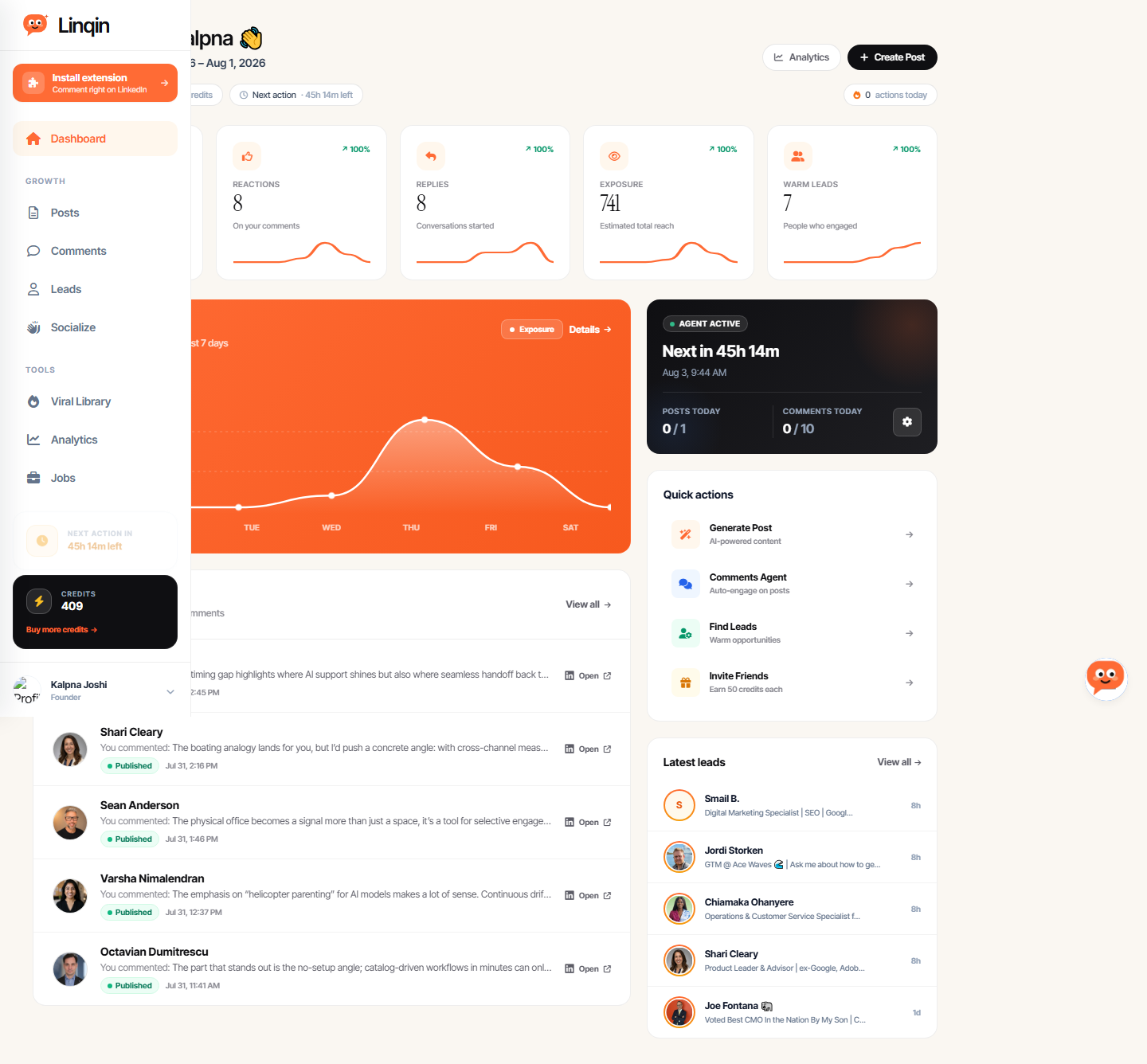
Widgets
| Widget | Content |
|---|---|
| Analytics summary | 38 AI comments posted, 741 estimated total reach, 7 warm leads |
| Engagement trend | Line chart — estimated exposure across last 7 days. Current: 741 ↗ 100% vs prev 7 days |
| Recent comments | Latest published LinkedIn comments with: target name, comment preview, timestamp, Open link |
| Quick actions | Create Post, Comments Agent, Find Leads, Invite Friends |
| Latest leads | Recent warm leads with heat scores |
Key Metrics Displayed
- COMMENTS: 38 AI comments posted (100%)
- REACTIONS: On your comments (100%)
- REPLIES: Conversations started (100%)
- EXPOSURE: 741 estimated total reach (100%)
- WARM LEADS: People who engaged (100%)
All metrics show “100%” — likely because the account is new (connected Jul 29, 2026) and this is the first week of activity.
Sample Recent Comments (visible on dashboard)
- Jordi Storken — Commented on timing gap / AI support / human handoff
- Shari Cleary — Cross-channel measurement / streaming / YouTube / FAST
- Sean Anderson — Physical office as signal / selective engagement
3. Posts Agent
URL: /dashboard/posts
Title: Posts Agent - Linqin
H1: “Posts Agent”
Subtitle: “Auto-generate LinkedIn posts from your topics using AI.”
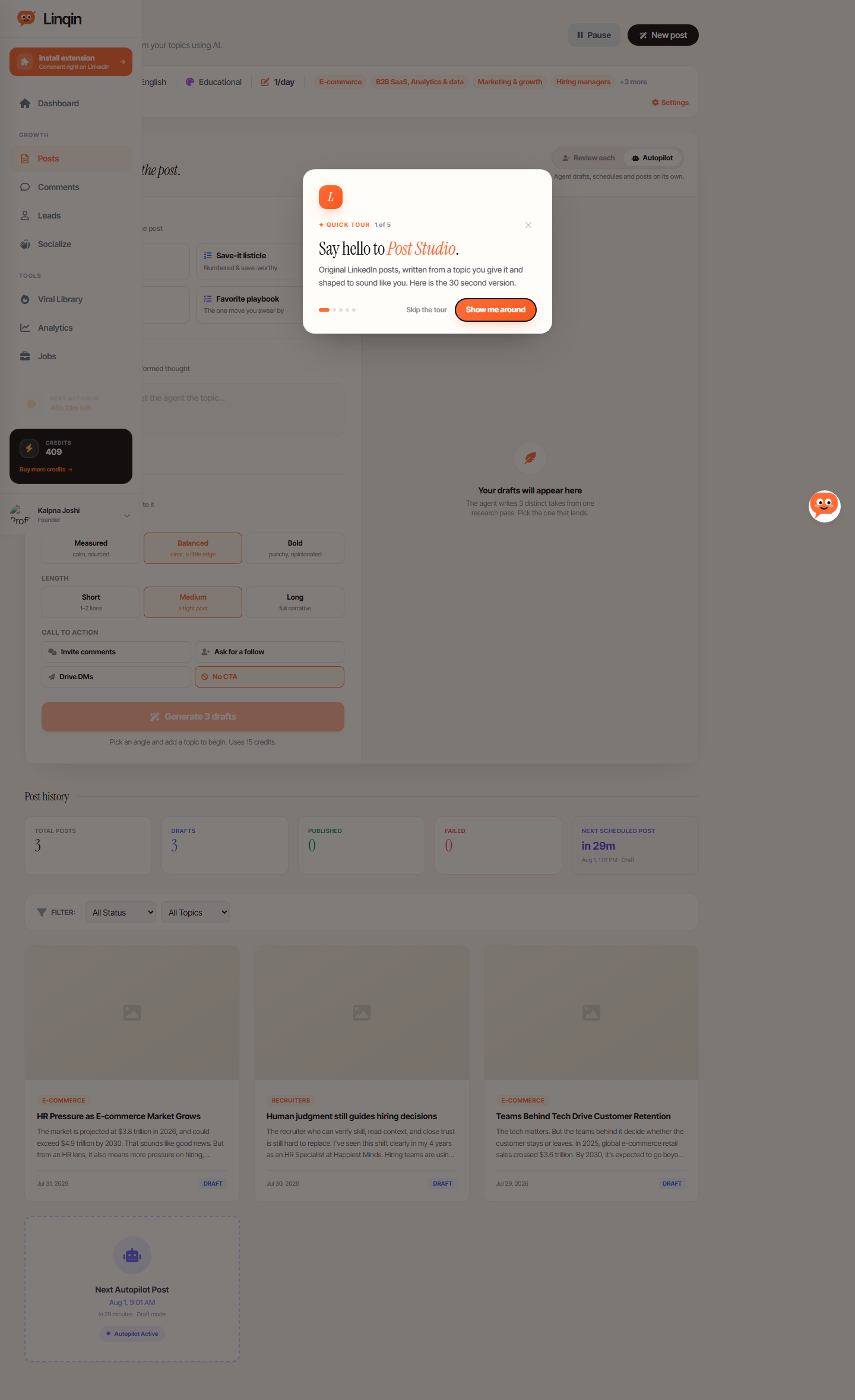
Post Studio (Main Creation Interface)
Step 1 — Pick your angle (4 options):
| Angle | Description |
|---|---|
| Uncopyable insight | Bold claim, real proof |
| Save-it listicle | Numbered & save-worthy |
| Bold prediction | A take that divides |
| Favorite playbook | The one move you swear by |
Step 2 — What’s it about?
- Text input: “Pick an angle first, then tell the agent the topic…”
- Optional: “Ground it in a source” — paste a URL or text
Step 3 — Dial it in (Voice, Length, CTA):
| Setting | Options |
|---|---|
| VOICE | Measured (calm, sourced) / Balanced (clear, a little edge) / Bold (punchy, opinionated) |
| LENGTH | Short (1–2 lines) / Medium (a tight post) / Long (full narrative) |
| CALL TO ACTION | Invite comments / Ask for a follow / Drive DMs / No CTA |
Generate button: “Generate 3 drafts” — uses 15 credits. Agent writes 3 distinct takes from one research pass.
Post History
| Metric | Value |
|---|---|
| Total Posts | 3 |
| Drafts | 3 |
| Published | 0 |
| Failed | 0 |
| Next Scheduled | In 22m (Aug 1, 1:01 PM) |
Filters: All Status (Drafts / Published / Failed), All Topics
Sample Drafts:
- E-COMMERCE — “HR Pressure as E-commerce Market Grows” — The market is projected at $3.8 trillion in 2026…
- RECRUITERS — “Human judgment still guides hiring decisions”
- E-COMMERCE — “Teams Behind Tech Drive Customer Retention”
Autopilot Mode
- Toggle: Review each vs Autopilot
- Autopilot: “Agent drafts, schedules and posts on its own.”
- Next Autopilot Post scheduled widget shown
Active Topics (shown as tags)
Happiest Minds, English, Educational, 1/day, E-commerce, B2B SaaS Analytics & data, Marketing & growth, Hiring managers, +3 more
Post Actions (per draft)
- Publish now, Add image, Copy, Edit, Draft another
- Edit Content, Publish to LinkedIn, Copy to Clipboard, Rewrite with AI
4. Comments Agent
URL: /dashboard/comments
Title: Linqin Agent - Linqin
H1: “Comments Agent”
Subtitle: “Your automated LinkedIn commenting assistant.”
Configuration
- Comment Like: 10/day (plan limit)
- Active Topics: English, E-commerce, B2B SaaS Analytics & data, Marketing & growth, Hiring managers, +3 more
- Settings gear icon
Metrics
| Metric | Value |
|---|---|
| TOTAL | 43 all-time comments |
| POSTED | 38 successfully published |
| FAILED | 5 could not publish |
| REMAINING | 10 of 10 today |
| NEXT COMMENT | in 45h 6m (Aug 3, 9:44 AM) |
| NEXT FIND | Overdue (last ran 3h+ ago) |
Comment Generation
- Generate Comment button
- Comment style options: 🧠 Value-adding (Insightful additions), 🤗 Supportive (Appreciative tone), ❓ Question-based (Engaging inquiries)
Comment History
Filters: All Status (Drafts / Scheduled / Published / Failed)
Sample scheduled comment (Smail B.):
“The problem usually starts with one number. Last-click revenue. It looks clean. It feels safe. It fits nicely in a report. But it misses how people actually buy across search, paid social, email, direct traffic and brand activity…“
5. Warm Leads
URL: /dashboard/warm-leads
Title: Warm Leads | Linqin
H1: “Warm Leads”
Subtitle: “People who noticed you, ranked by how warm they are right now.”
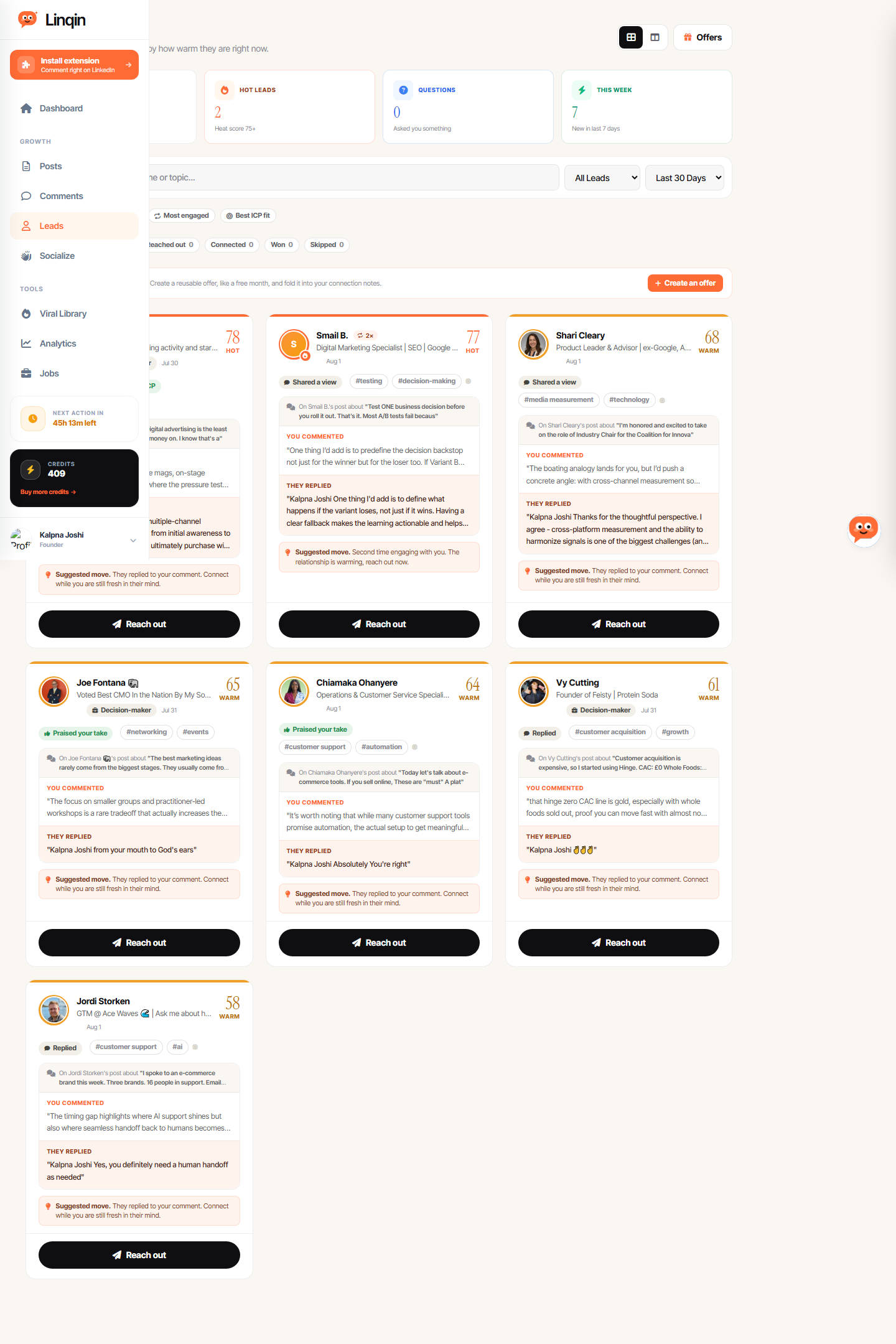
Metrics
| Metric | Value |
|---|---|
| TOTAL LEADS | Unique people |
| HOT LEADS | Heat score 75+ |
| QUESTIONS | Asked you something |
| THIS WEEK | New in last 7 days |
Filters
- Type: All Leads / Replies Only / Likes Only
- Time: Last 7 Days / Last 30 Days / All Time
- Sort: Hottest / Newest / Most engaged / Best ICP fit
- Pipeline: All / New / Reached out / Connected / Won / Skipped
Lead Cards (detailed)
Each lead shows:
- Name + Headline (LinkedIn profile headline)
- Tags: Decision-maker, Matches your ICP, marketing sales
- Heat score (e.g., 78 — HOT)
- Interaction: “On [Name]‘s post about…”
- Your comment (preview)
- Their reply (preview)
- Suggested move: “They replied to your comment. Connect while you are still fresh in their mind.”
- Action button: “Reach out”
Sample Leads
- Chuck Moxley — Fractional CMO, 25 years, 6-time SaaS CMO — Score 78 (HOT) — Replied
- Smail B. — Digital Marketing Specialist — 2× interactions
- Shari Cleary — (replied to comment)
- Jordi Storken — (replied to comment)
- Sean Anderson — (replied to comment)
Offers Feature
“Attach an offer to your notes — Create a reusable offer, like a free month, and fold it into your connection notes.”
6. Socialize
URL: /dashboard/socialize
Title: Socialize - Linqin
H1: “Socialize”
Subtitle: “Members boost each other’s posts with real likes and comments.”
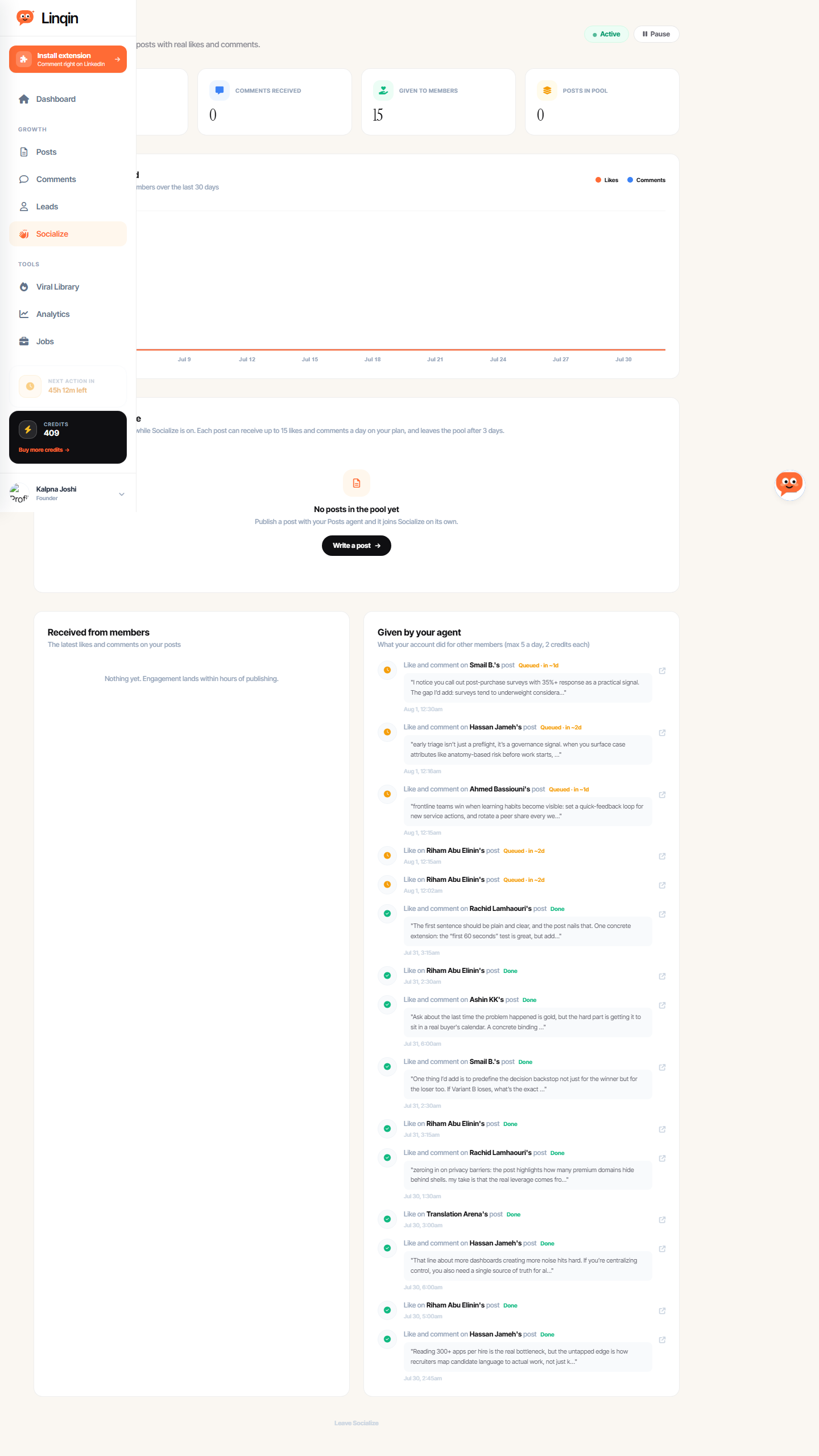
Status
- Active (toggle to Pause)
- LIKES RECEIVED: 0
- COMMENTS RECEIVED: 0
- GIVEN TO MEMBERS: 0
- POSTS IN POOL: 0
How It Works
- New posts join automatically while Socialize is on
- Each post can receive up to 15 likes and comments a day (on Starter plan)
- Posts leave the pool after 3 days
- Max 5 actions a day for your account, 2 credits each
Queued Actions (visible)
- Like and comment on Smail B.’s post — Queued in ~1d
- Like and comment on Hassan Jameh’s post — Queued in ~2d
- Like and comment on Ahmed Bassiouni’s post — Queued in ~1d
- Like on Riham Abu Elinin’s post — Queued in ~2d (×2)
7. Viral Library
URL: /dashboard/viral
Title: Viral Library - Linqin
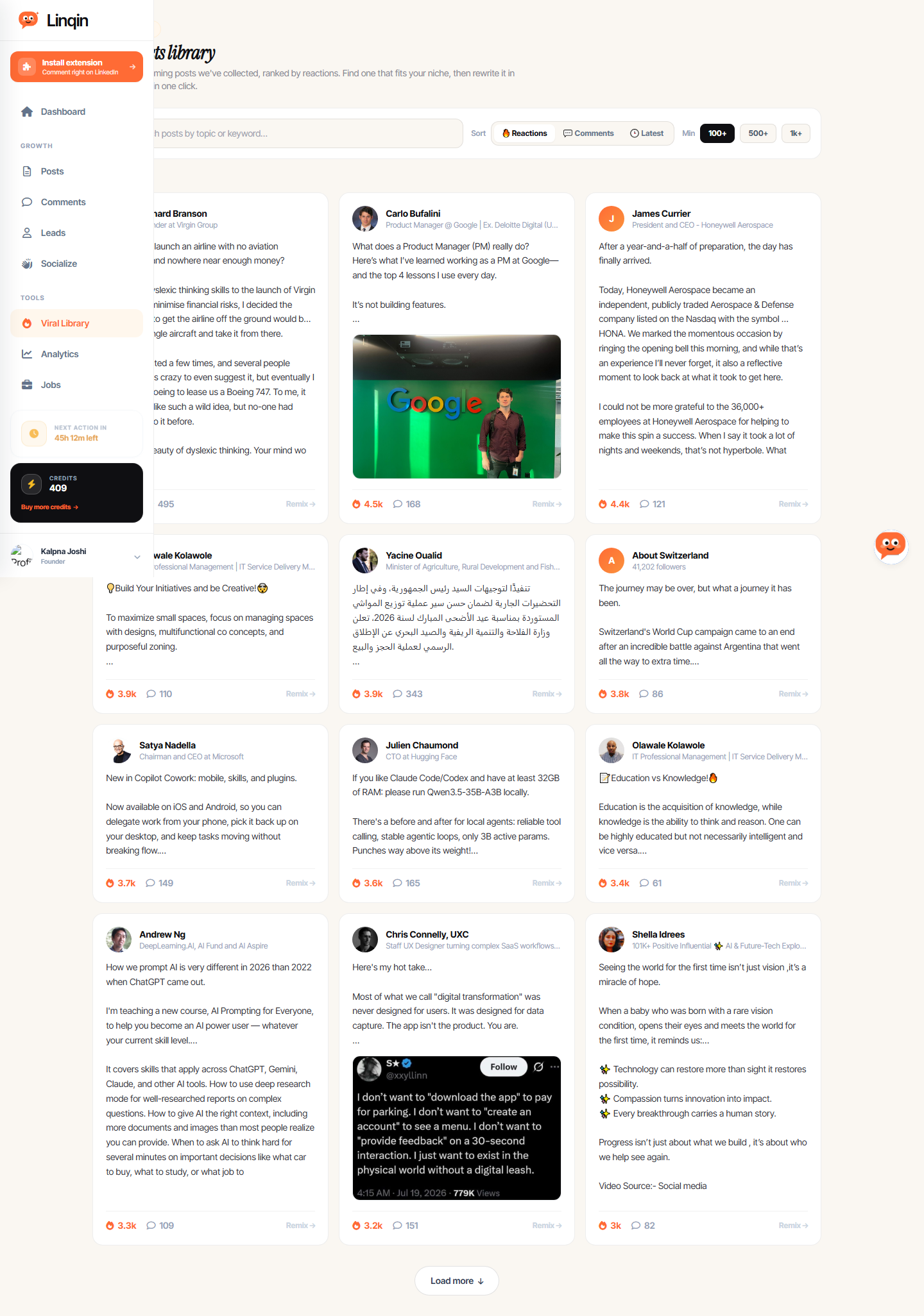
H1: “Viral posts library”
Subtitle: “The best-performing posts we’ve collected, ranked by reactions. Find one that fits your niche, then rewrite it in your own voice in one click.”
Filters
- Sort: 🔥 Reactions / 💬 Comments / 🕒 Latest
- Min reactions: 100+ / 500+ / 1k+
- Count: “5k viral posts”
Post Cards
Each shows:
- Author name + headline
- Post content (preview)
- Reaction count (e.g., 7.2k)
- Comment count (e.g., 495)
- “Remix” button — rewrite in your voice in one click
Sample Posts
- Richard Branson — Founder at Virgin Group — “How do you launch an airline…” — 7.2k reactions
- Carlo Bufalini — Product Manager @ Google — “What does a PM really do?” — viral post
8. Analytics
URL: /dashboard/analytics
Title: Analytics - Linqin
H1: “Analytics”
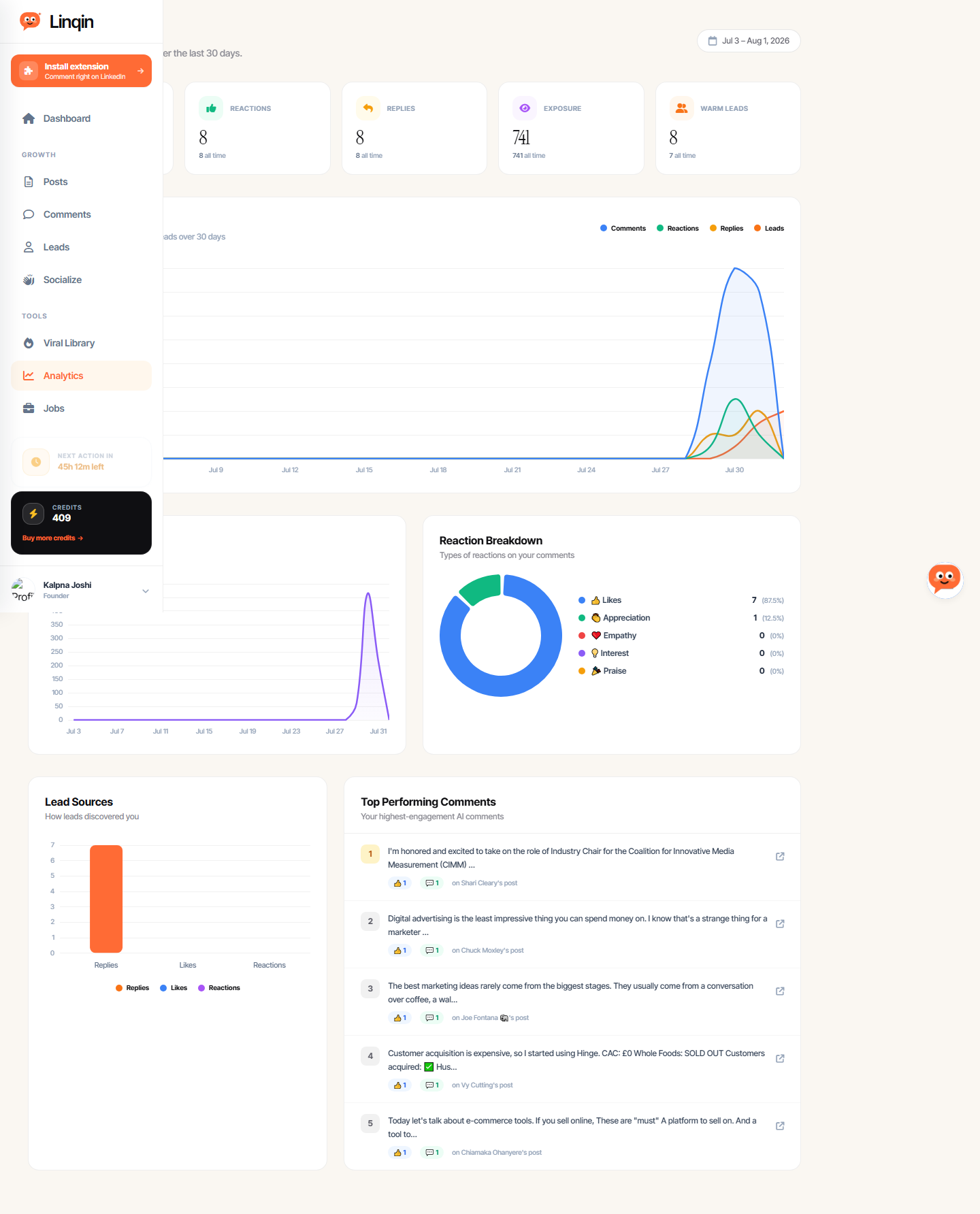
Subtitle: “Your LinkedIn growth insights over the last 30 days.”
Period: Jul 3 – Aug 1, 2026
Summary Metrics
| Metric | Value |
|---|---|
| COMMENTS | 38 (all time) |
| REACTIONS | 8 (all time) |
| REPLIES | 8 (all time) |
| EXPOSURE | 741 (all time) |
| WARM LEADS | 7 (all time) |
Charts
- Growth Overview — Comments, reactions, replies & leads over 30 days (line chart)
- Exposure Trend — Estimated reach over 30 days (line chart)
- Reaction Breakdown — 👍 Likes (87.5%), 👏 Appreciation (12.5%), ❤️ Empathy (0%), 💡 Interest (0%), 🎉 Praise (0%), 💪 Support (0%)
- Lead Sources — How leads discovered you (Replies / Likes / Reactions)
Top Performing Comments
List of highest-engagement AI comments with:
- Comment preview text
- 👍 and 💬 counts
- Target post author name
9. Jobs
URL: /dashboard/jobs
Title: Jobs — Linqin
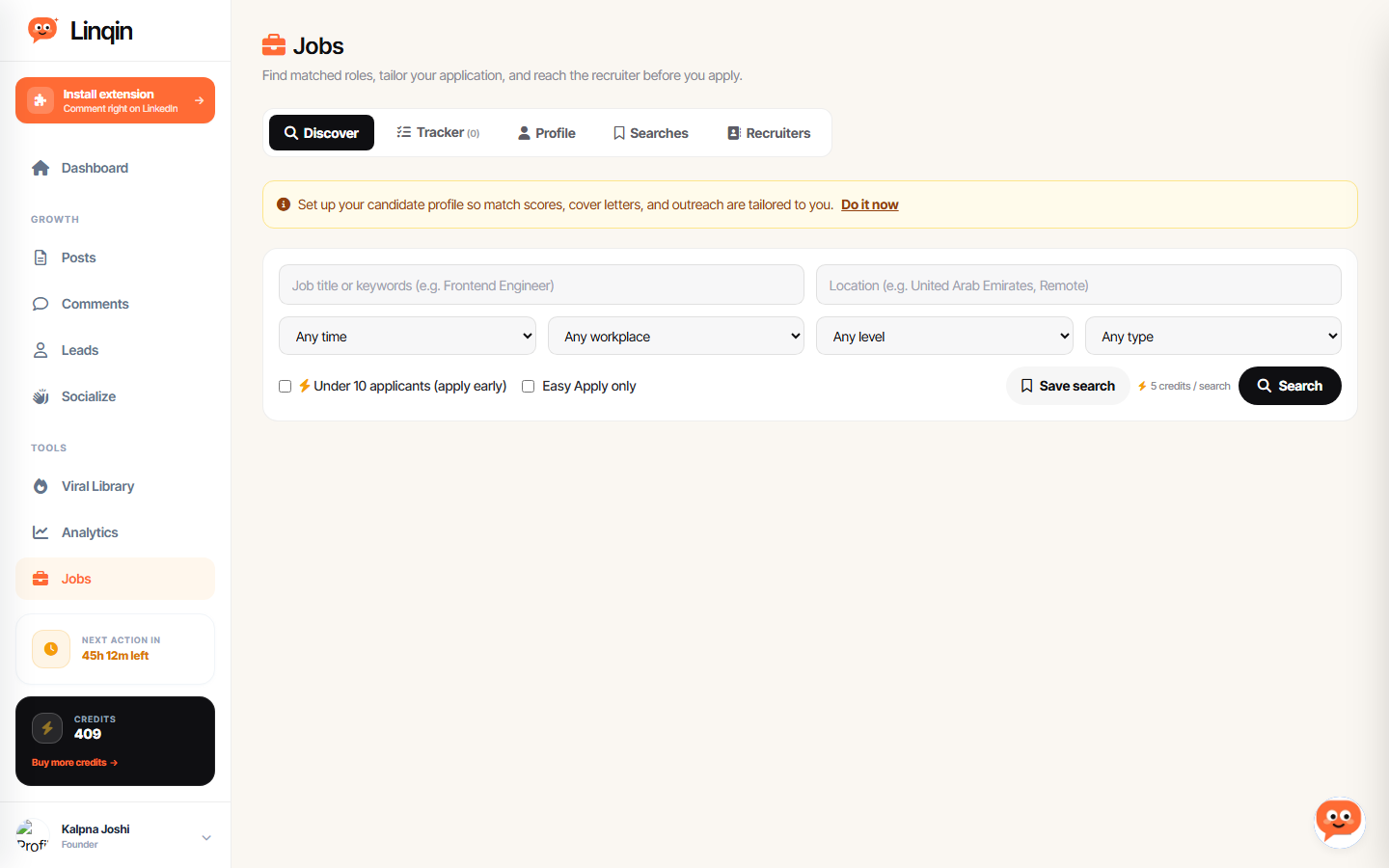
H1: “Jobs”
Subtitle: “Find matched roles, tailor your application, and reach the recruiter before you apply.”
Tabs
- Discover — Job search
- Tracker (0) — Track applications
- Profile — Candidate profile setup
- Searches — Saved searches
- Recruiters — Recruiter outreach
Search Filters
- Time: Any time / Past 24h / Past week / Past month
- Workplace: Remote / Hybrid / On-site
- Level: Internship / Entry / Associate / Mid-Senior / Director / Executive
- Type: Full-time / Part-time / Contract / Internship
- Extras: Under 10 applicants, Easy Apply only
- Cost: 5 credits / search
- Save search option
Profile Setup Prompt
“Set up your candidate profile so match scores, cover letters, and outreach are tailored to you.”
10. Brand Settings
URL: /dashboard/brand
Title: Brand Settings - Linqin
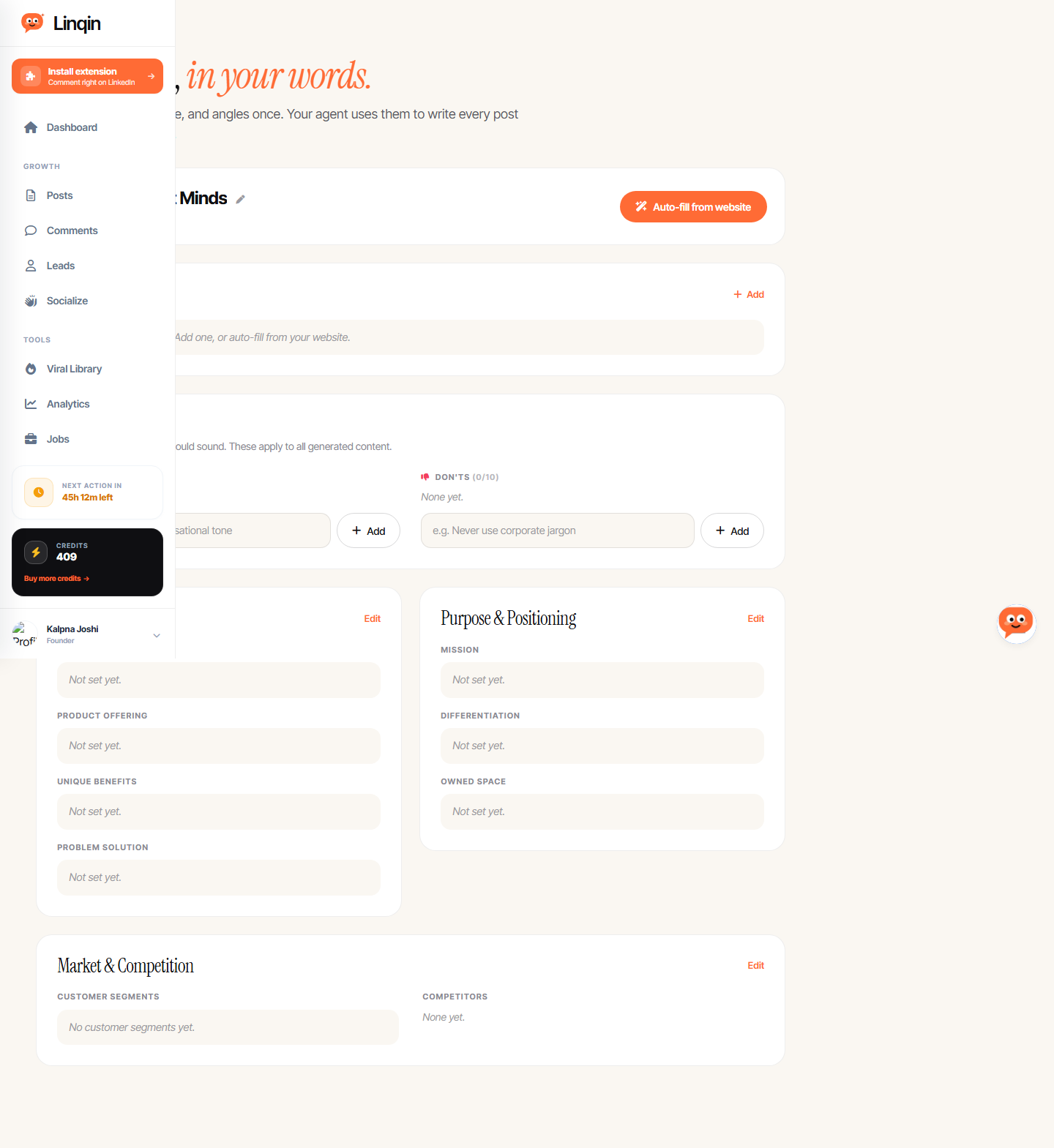
H1: “Your brand, in your words.”
Subtitle: “Define your identity, voice, and angles once. Your agent uses them to write every post and rewrite in your voice.”
Current Brand
- Company: Happiest Minds
- LinkedIn: linkedin.com
- Auto-fill from website button
Brand Sections
| Section | Fields | Status |
|---|---|---|
| Content Angles | Add custom angles | Empty (0) |
| Tone & Voice | DO’s (0/10), DON’TS (0/10) | Empty |
| Identity & Product | Core Identity, Product Offering, Unique Benefits, Problem Solution | Not set |
| Purpose & Positioning | Mission, Differentiation, Owned Space | Not set |
| Market & Competition | Customer Segments, Competitors | Empty |
11. Invite / Referrals
URL: /dashboard/invite
Title: Invite Friends - Linqin
H1: “Bring a friend, earn credits.”
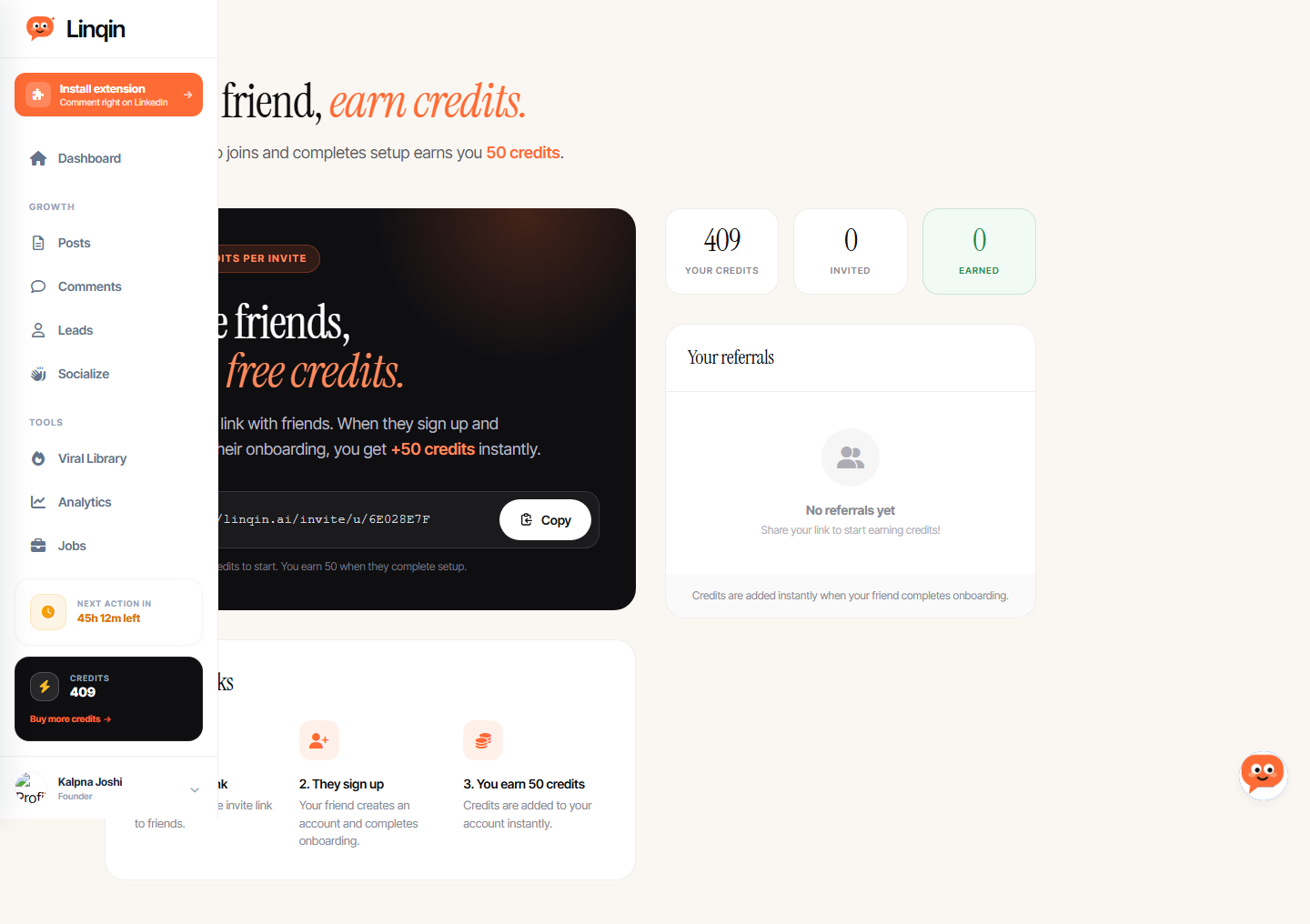
Referral Program
- Reward: 50 credits per successful referral
- Friend gets: 100 credits to start
- Your link:
https://linqin.ai/invite/u/6E028E7F - Your credits: 409
- Invited: 0
- Earned: 0
How It Works
- Share your unique invite link
- Friend signs up and completes onboarding
- You earn 50 credits instantly
12. Billing & Plans
URL: /dashboard/billing
Title: Billing - Linqin
H1: “Billing & Plans”
Subtitle: “Manage your subscription and credits”
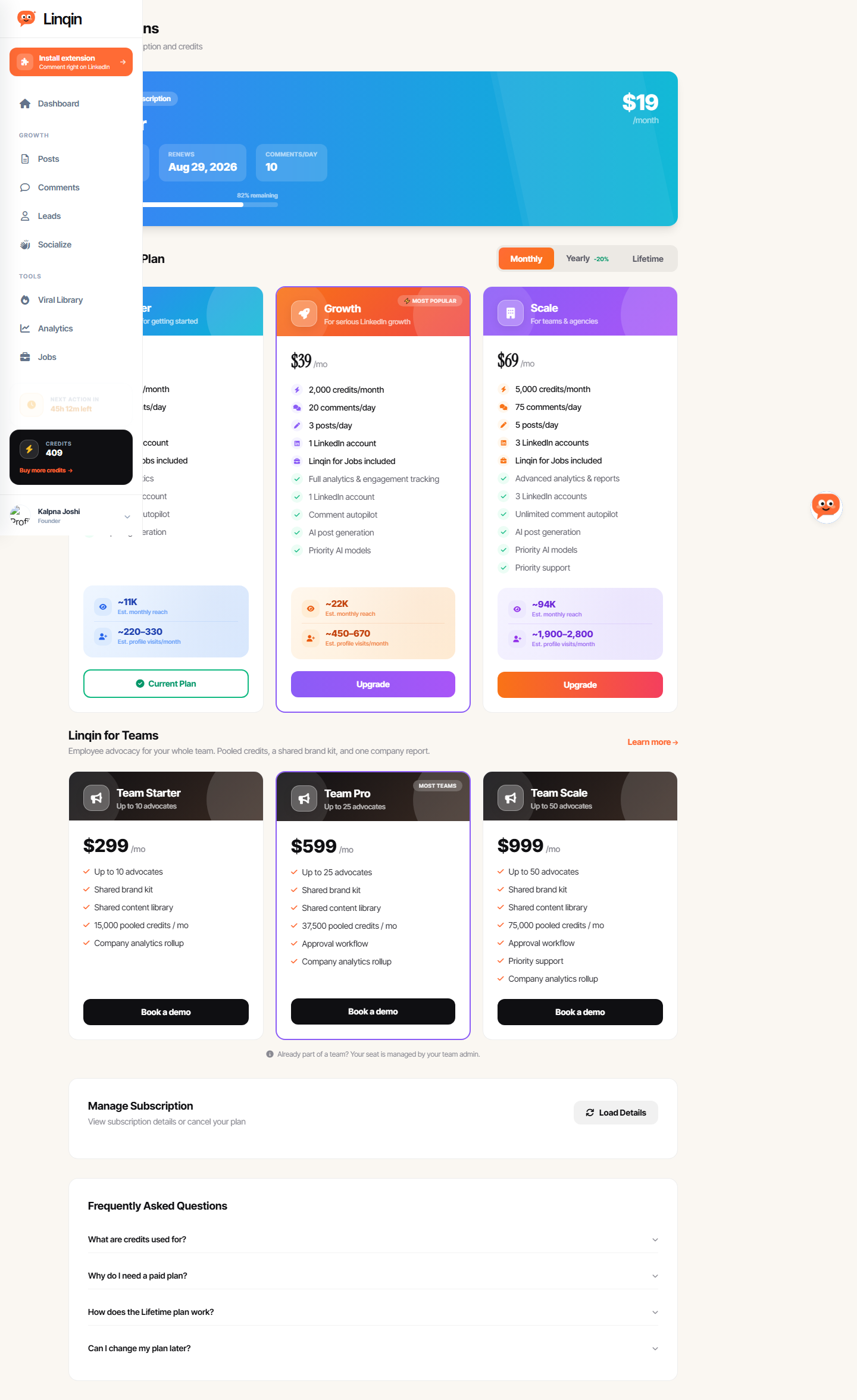
Current Subscription
- Plan: Starter
- Status: Active
- Credits: 409 / 500 (82% remaining)
- Renews: Aug 29, 2026
- Comments/day: 10
- Price: $19/month
Plan Comparison (as shown in-app)
| Feature | Starter ($19) | Growth ($39) | Scale ($69) |
|---|---|---|---|
| Credits/month | 500 | 2,000 | 5,000 |
| Comments/day | 10 | 20 | 75 |
| Posts/day | 1 | 3 | 5 |
| LinkedIn accounts | 1 | 1 | 3 |
| Linqin for Jobs | ✅ | ✅ | ✅ |
| Analytics | Basic | Full | Advanced + reports |
| Comment autopilot | ✅ | ✅ | Unlimited |
| AI post generation | ✅ | ✅ | ✅ |
| Priority AI models | — | ✅ | ✅ |
| Priority support | — | — | ✅ |
| Est. monthly reach | ~11K | ~22K | ~94K |
| Est. profile visits/mo | ~220–330 | ~450–670 | ~1,900–2,800 |
Note: The in-app pricing differs from the public website! The public site shows 25/19/69. The Growth tier is 25 on the public site.
Team Plans
- Team Starter: Up to 10 advocates, $299/mo, 15,000 pooled credits
- Team Pro: Up to 25 advocates, $599/mo, 37,500 pooled credits
- Team Scale: Up to 50 advocates, $999/mo, 75,000 pooled credits
Billing Toggle
- Monthly / Yearly (-20%) / Lifetime
13. Settings
URL: /dashboard/settings
Title: Settings - Linqin
H1: “Settings”
Subtitle: “Manage your profile, social links, and security.”
Sections
Profile Information
- Full Name: Kalpna Joshi
- Email: lakshhari55@gmail.com
- LinkedIn URL (editable)
- Website URL (editable)
- Save Changes button
LinkedIn Accounts
- 1 / 1 limit reached (Upgrade to add more)
- Kalpna Joshi — PRIMARY — Active — Connected Jul 29, 2026
Security
- Password: Update button
- Log Out of All Devices button
14. User Flows
Flow 1: Daily Commenting
- Agent finds relevant posts based on topics (E-commerce, B2B SaaS, etc.)
- Generates comment in selected style (Value-adding / Supportive / Question-based)
- Schedules or auto-publishes (up to 10/day on Starter)
- Tracks reactions, replies, and warm leads
Flow 2: Post Creation
- User selects angle (Insight / Listicle / Prediction / Playbook)
- Enters topic (optional source URL)
- Sets voice, length, CTA
- Generates 3 drafts (15 credits)
- Reviews, edits, publishes or schedules
- Autopilot mode: agent drafts, schedules, and posts automatically
Flow 3: Lead Generation
- Agent comments on posts → target notices
- Target replies or likes → becomes “warm lead”
- Lead scored by heat (75+ = HOT)
- User sees suggested move (“They replied — connect now”)
- User can attach an offer (reusable template)
- Pipeline tracking: New → Reached out → Connected → Won → Skipped
Flow 4: Socialize (Reciprocal Engagement)
- User publishes a post
- Post joins the Socialize pool automatically
- Other members like and comment on it (up to 15/day)
- User’s agent reciprocates on other members’ posts (max 5/day)
- Post leaves pool after 3 days
Flow 5: Job Search
- User sets up candidate profile
- Searches jobs with filters (role, level, location, type)
- 5 credits per search
- Tracks applications in Tracker
- “Reach the recruiter before you apply” — outreach feature
15. Key Takeaways for GrowReach
What Linqin Does Well (In-App)
- Clean, intuitive UI — Sidebar navigation is simple, each page has a clear single purpose
- Post Studio — The angle + voice + length + CTA flow is excellent UX. 4 angles cover most content types
- Warm Leads scoring — Heat scores + suggested moves + pipeline tracking is a strong conversion feature
- Socialize — Reciprocal engagement creates network effects and lock-in
- Viral Library — 5k viral posts with “Remix” button is a powerful content inspiration tool
- Brand Settings — Structured brand definition (angles, voice, identity, positioning, market) feeds all content generation
- Credit system — Transparent, easy to understand, creates upgrade pressure
Gaps & Weaknesses
- Pricing discrepancy — In-app shows 39/17/69. Confusing for users
- No multi-platform — LinkedIn only. No Reddit, X/Twitter, etc.
- No API/integrations — No CRM, Zapier, or webhook connections visible
- Limited analytics — Basic metrics only. No funnel visualization, no A/B testing
- No persona validation — Brand settings are manual entry, no market research integration
- Socialize requires critical mass — Empty pool = no value until enough members join
- Jobs feature is tangential — Feels like scope creep for a LinkedIn engagement tool
Opportunities for GrowReach
- Multi-platform — Linqin is LinkedIn-only. GrowReach’s Reddit capability is a genuine differentiator
- Persona-based targeting — Linqin has brand voice but no validated personas from market research
- Pricing — GrowReach can compete at 39 Growth plan
- Comment quality — Linqin’s comments are good but detectable as AI. GrowReach’s human-like approach is a differentiator
- Integration ecosystem — No CRM/Zapier integrations visible = opportunity for GrowReach
Documentation generated by Hermes Agent on August 1, 2026. All data extracted from live exploration of linqin.ai product dashboard.